AI coding tools like Cursor AI and GitHub Copilot have transformed how developers write code. But there's a gap between what you want and what AI builds.
BMAD bridges that gap.
What is BMAD?
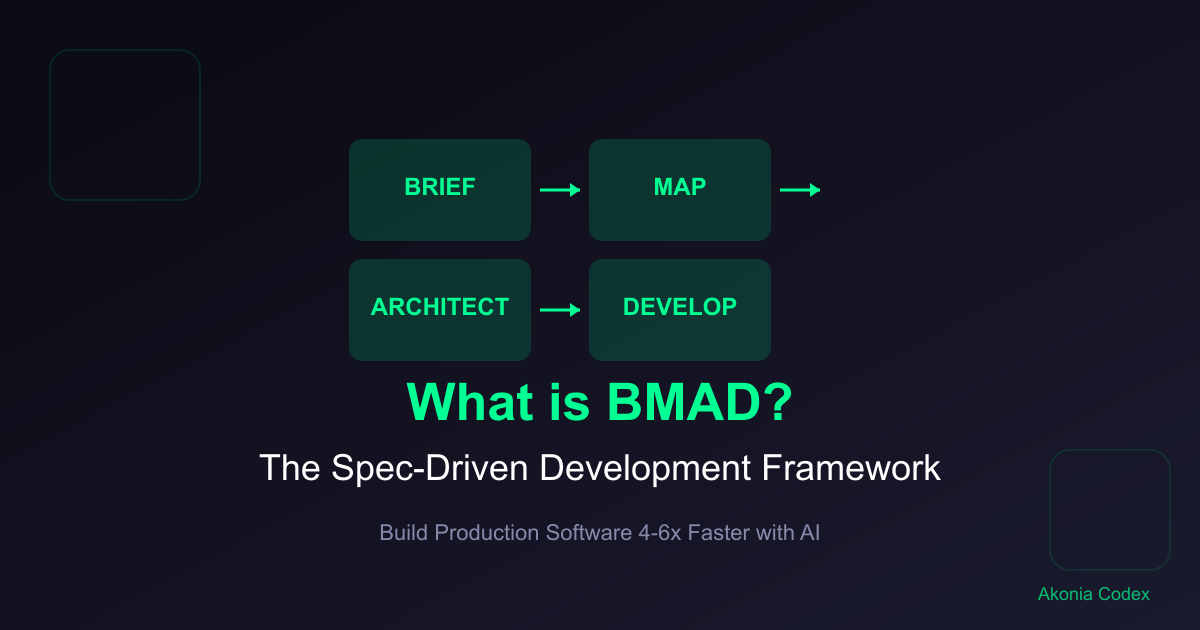
BMAD stands for Brief, Map, Architect, Develop—a free, open-source methodology for spec-driven development with AI. It provides structured workflows and specialized tools to help developers write clear specifications that AI coding tools can follow precisely.
Think of BMAD as the operating system for AI-native development. It doesn't replace AI tools—it makes them 4-6x more effective by giving them the clear instructions they need.
The BMAD Framework
1. Brief
Write clear specifications before coding.
The Brief phase is about defining exactly what you want to build. Instead of pasting vague requirements into an AI tool, you create a structured specification that includes:
- Functional requirements
- Technical constraints
- User flows
- Edge cases
- Success criteria
# Spec: User Authentication Feature

## Overview
Allow users to register and login with email/password.

## Requirements
- Email validation (format + uniqueness)
- Password hashing with bcrypt
- JWT token generation
- Session management

## Technical Constraints
- Framework: React + Express
- Database: PostgreSQL
- Auth: JWT tokens
- Security: bcrypt, input validation

## User Flow
1. User enters email/password
2. System validates credentials
3. System generates JWT token
4. User redirected to dashboard

## Edge Cases
- Invalid credentials
- Duplicate email
- Weak password
- Expired token
2. Map
Plan your architecture before implementation.
The Map phase focuses on system architecture and data flow. You define:
- Component hierarchy
- Data models
- API endpoints
- State management
- Integration points
# Architecture: Authentication System

## Components
- LoginForm (presentation)
- AuthAPI (backend service)
- TokenManager (utility)
- UserStore (state management)

## Data Flow
User → LoginForm → AuthAPI → Database → Token → UserStore → Dashboard

## API Endpoints
POST /api/auth/register
POST /api/auth/login
POST /api/auth/refresh
POST /api/auth/logout

## State Management
- User session in UserStore
- Token in localStorage
- Auth state reactive
3. Architect
Design components and data structures.
The Architect phase is about detailed design:
- Component interfaces
- Data schemas
- Function signatures
- Class structures
- Type definitions
// Type definitions for authentication
interface User {
  id: string;
  email: string;
  createdAt: Date;
}

interface AuthTokens {
  accessToken: string;
  refreshToken: string;
  expiresAt: Date;
}

interface LoginRequest {
  email: string;
  password: string;
}

interface AuthResponse {
  user: User;
  tokens: AuthTokens;
}
4. Develop
Generate and implement code to specification.
The Develop phase is where AI tools shine. With clear specs:
- Feed spec to Cursor AI or Copilot
- Review generated code
- Integrate and test
- Iterate if needed
The difference? AI generates code that matches your specs on the first try—no back-and-forth, no debugging mismatches.
Why BMAD Works
Traditional development with AI tools:
Paste vague requirements → AI guesses wrong → Debug → Retry → Eventually get it right
BMAD-driven development:
Write spec → Feed to AI → Get working code → Test → Ship
The key difference is explicit constraints. When you tell AI exactly what to build, what constraints to follow, and what edge cases to handle, it generates code that works.
BMAD Tools and Resources
BMAD is more than a methodology—it's a toolkit for spec-driven development.
Core Tools
Spec Templates: Pre-built templates for common features
- Authentication flows
- CRUD operations
- Form validation
- API endpoints
- Database schemas
Prompts Library: AI prompts optimized for different tools
- Cursor AI prompts
- GitHub Copilot prompts
- ChatGPT prompts
- Claude prompts
Validation Checklists: Ensure your specs are complete
- Functional requirements
- Technical constraints
- Edge cases
- Error handling
- Testing criteria
GitHub Repository
BMAD is open-source and available on GitHub:
https://github.com/bmad-code-org/BMAD-METHOD
The repository includes:
- Complete methodology documentation
- Spec templates
- Prompt examples
- Integration guides
- Community contributions
Using BMAD with Cursor AI
Cursor AI is one of the best tools for spec-driven development. Here's how to use BMAD with Cursor:
# Cursor AI Prompt with BMAD Spec

I need you to build this feature to specification.

## Feature Spec
[Your BMAD spec here]

## Requirements
- Follow the spec exactly
- Use the specified tech stack
- Handle the listed edge cases
- Include error handling

Please generate production-ready code.
Cursor AI excels at this workflow because it can maintain context across large codebases and understand complex specifications.
Using BMAD with GitHub Copilot
GitHub Copilot works great with BMAD for smaller, focused tasks:
// BMAD Spec: User Registration
// Input: email (string), password (string)
// Output: user object with token
// Validation: email format, password strength
// Error handling: duplicate email, weak password

// Implement following this spec:
async function registerUser(email, password) {
  // Your implementation here
}
Copilot's strength is in generating specific code blocks that match your specifications.
Real Results: 4-6x Faster Development
Developers using BMAD report:
Productivity Gains:
- 4-6x faster feature development
- Fewer debugging cycles
- More consistent code quality
- Better documentation (specs ARE documentation)
Quality Improvements:
- Fewer production bugs
- Better error handling
- More consistent architecture
- Easier code reviews
Team Benefits:
- Clearer communication
- Easier handoffs
- Better onboarding
- Shared understanding
BMAD for Different Development Scenarios
Solo Developers
BMAD helps solo developers maintain consistency and avoid common pitfalls. Your specs become your documentation and architectural decisions.
Small Teams
BMAD provides a shared language for requirements and design. Everyone understands what "done" means for each feature.
Large Organizations
BMAD scales spec-driven development across teams. Create standard templates and processes for consistent output.
Agency Work
BMAD helps agencies deliver client work faster with fewer misunderstandings. Clients review specs, not code—faster iterations.
Getting Started with BMAD
Step 1: Read the Documentation
Visit the GitHub repository and read the complete methodology guide.
Step 2: Try a Simple Spec
Start with a simple feature like a contact form or authentication flow. Write a complete spec following the BMAD template.
Step 3: Generate Code with AI
Feed your spec to Cursor AI or Copilot and see how well it matches your requirements.
Step 4: Iterate and Refine
Review the generated code, identify gaps in your spec, and refine your process.
BMAD vs Traditional Development
| Aspect | Traditional | BMAD |
|---|---|---|
| Requirements | Vague, changing | Specified upfront |
| Architecture | Emerges during coding | Planned before implementation |
| Code Generation | Trial and error | Spec-driven |
| Debugging | 40% of time | 10% of time |
| Documentation | After the fact | Built-in (specs) |
| Handoffs | Complex | Specs are the interface |
Common BMAD Misconceptions
"BMAD is just templates"
BMAD includes templates, but it's primarily a methodology for thinking clearly about what you're building before you build it.
"BMAD replaces AI tools"
BMAD enhances AI tools—it doesn't replace them. You still use Cursor AI, Copilot, or other tools. BMAD just makes them more effective.
"BMAD is for complex projects only"
BMAD works for any size project. Simple projects benefit from clarity, complex projects benefit from structure.
"BMAD adds overhead"
Writing specs takes time upfront but saves hours of debugging and rework. Net time savings: 3-5x.
The BMAD Community
BMAD is open-source and community-driven. Contributors include:
- Solo developers
- Startup founders
- Agency teams
- Enterprise engineers
Join the community:
- GitHub: https://github.com/bmad-code-org/BMAD-METHOD
- Share your spec templates
- Contribute prompt examples
- Help improve the methodology
Learning BMAD: Next Steps
BMAD is simple to learn but powerful to master. The learning curve:
Week 1: Learn the framework (Brief, Map, Architect, Develop)
Week 2: Practice writing specs for common features
Week 3: Integrate with your AI tools of choice
Week 4: Build complete projects using BMAD
Want to Master Spec-Driven Development?
We teach BMAD in our comprehensive training programs:
- BMAD Fundamentals: Learn the framework and core concepts
- Spec Writing: Master the art of clear specifications
- AI Integration: Use BMAD with Cursor AI, Copilot, and other tools
- Production Projects: Build real applications with spec-driven development
Next step: Join our Spec-Driven Development Masterclass and learn to build production software 4-6x faster with BMAD.
Conclusion
BMAD isn't a tool—it's a methodology that makes your existing tools more effective. Whether you're using Cursor AI, GitHub Copilot, or any other AI coding assistant, BMAD helps you write the clear specifications these tools need to generate working code.
Stop guessing. Start speculating. Build better software faster with BMAD.
#BMAD#spec-driven development#AI development#Cursor AI#GitHub Copilot#open-source#methodology
Share this article
Stay Updated
Get the latest development tips delivered to your inbox.